
Home / Blog
Insights to Keep You Ahead
Practical IT, security, and cloud guidance for Bay Area business leaders.
-
Network Optimization Tips for Faster Performance
Fast and reliable network performance is essential for both businesses and individuals today. Slow connections can frustrate users, lower productivity,…
-
Choosing the Right IT Help Desk for Your Industry
Finding the right IT help desk is a vital decision for any company that relies on technology. The right help desk…
-
What Is a Security Audit and Why You Need One
A security audit is a careful check of an organization’s digital systems, processes, and rules to make sure they are…
-
The Importance of Employee Cybersecurity Training
Every business faces online threats. Hackers send scam emails, try to trick workers, and spread harmful software. One mistake can…
-
How Multi-Layer Security Protects Your Business
Every day, businesses face online threats like malware, hackers, and phishing scams. A single security measure isn’t enough to keep…
-
Top Cyber Threats Facing Bay Area Businesses Today
Bay Area businesses face a range of cyber threats that put their data and operations at risk. These threats include…
-
Benefits of Outsourcing Network Monitoring to Experts
Businesses today rely on stable, secure networks to keep operations running smoothly. Outsourcing network monitoring to experts helps companies reduce costs,…
-
How To Stop Malware Attacks: Essential Prevention Strategies
In my last blog post, we discussed the basics of malware, reviewed the conditions malware requires and also introduced a few of the most common forms that it takes. Now that you’ve got a basic understanding of “what” it is, it’s time this IT support technician taught you how to avoid malware attacks before they can take hold of your systems.
Here are 6 simple yet crucial steps which will help prevent “disaster” situations from happening to your organization. As we continue, I’ll be providing you additional advice and malware protection tips from my years of experience working in the field of IT support services throughout the Bay Area.
1.) Have Two User Accounts

Log in to your PC as a standard user, not as an Administrator.
This means you should have two user accounts: one non-privileged user account, and one privileged user account. That way, anything that requires “elevated” access (non-standard privileges) will need to explicitly ask for your permission.
In order to maintain security, your administrator account should have a different password from your main account.
2.) Read Pop-Up Messages That Appear On Your System
This is an important part of avoiding malware problems in the first place. Do NOT just click “OK” to everything.
- Try not to get into the habit of hitting “OK” to everything: Web sites can create pop-up windows that masquerade as system warnings or update reminders.
- Without reading every pop-up, you could unknowingly enable a malware attack.
- If you are in doubt about a particular pop-up message that appears on your screen, try dragging it to the right or left of the web browser window.
If you can’t drag it outside of the web browser, it is not a system message.
Use the [X] button on the window to close it, and you may want to close your web browser as well (and avoid that web page in future!).
3.) Double-Check Application Updates

When you are prompted to install updates for well-known applications, make sure that it is something you actually have installed on your system. If you are in doubt about an update, close the window (using the [X] button) and visit the web site of the application vendor to check for the update.
4.) Use Automatic Updates For Existing Applications
If there is a way to automatically apply updates for an application you want, need, and trust, use that update method. It is better to allow trusted programs to update themselves automatically.
Example: If you have told Flash Player to “Always Update” without prompting you, and later you suddenly get a prompt to update Flash Player, you can be pretty sure it is a malware attack of some sort.
5.) Let Windows Update Download And Install Critical Updates.
Try to set a schedule for when you download full system updates. This will ensure that the download goes smoothly, and does not crash your computer. The ideal time is when your computer will be on, and your network connection will not be overloaded.
6.) Delete Questionable Emails
The simple rule for e-mail is when in doubt, throw it OUT.
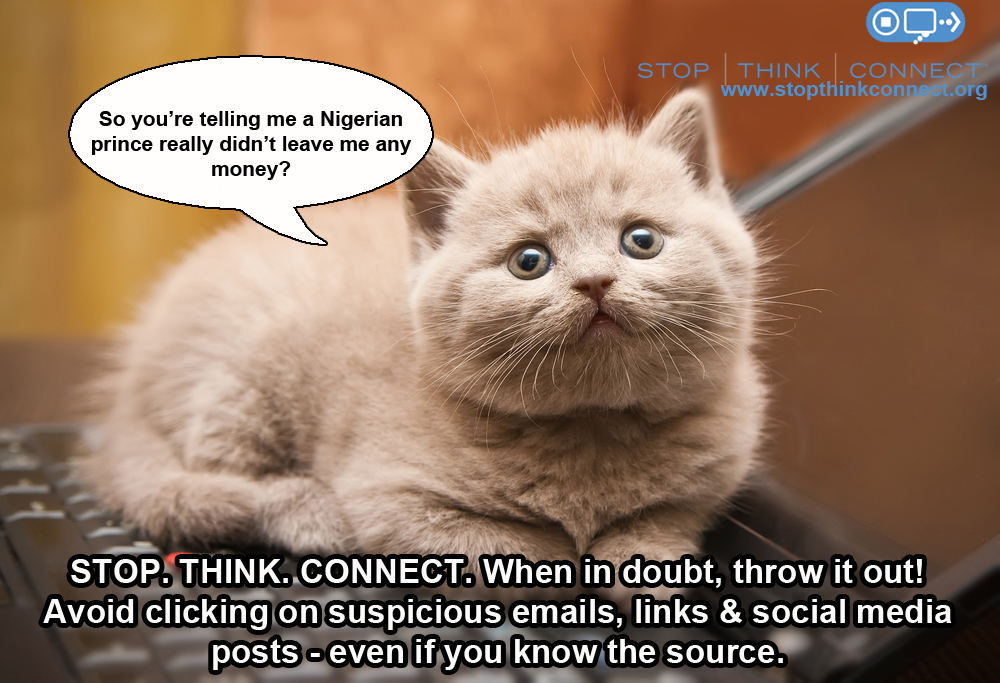
- Be highly skeptical of any attachment or link, even from people you know, unless it is something you know in advance is coming.
- It doesn’t hurt to call or text or e-mail someone to make sure. When an email seems out of place think of what Professor Moody always reminds Harry Potter: “Constant Vigilance!”
- Be especially wary of email messages purporting to be from your bank, from software vendors, or claiming to be fax messages.
- Example: If PayPal, Amazon or your bank sends you a link, it doesn’t hurt to simply open up the web site separately yourself, instead of clicking a link sent via e-mail.
- There are now many different ways to disguise a link – even experts can be fooled.
While these malware protection methods may take a few extra seconds, in the long-run they will help you avoid hours of downtime on clean-up and data recovery. If you are interested in a more advanced form of data security, give Bay Computing a call at 925.459.8500 to ask about our IT security solutions!
-
Top IT Tips to Keep Your Business Safe
Want to Keep Your Network and Your Business Safe?
Here’s What Your Employee End Users Really Need to Know: Advice from Your IT Support Technician

One of the most common things that people forget when thinking about office technology and network management is actually one of the its important elements: the basic security and daily habits of end users.
While those of us who work in IT solutions can put as many locks on the gates as we can possibly think of, it does absolutely NOTHING, if the people who actually use the business network don’t use, or don’t want to use, or simply don’t know how to use the fundamental security protocols listed below:
1.) Always Use Strong Passwords: Use passwords with at least 8 characters and three different variables of at least one uppercase letter, one lower case letter, and one number or symbol.
Your Protections Need Strength (and Complexity)
For example: 1L0v3B@y! or J@m3$=Kool

Common and Simple Passwords Don’t Keep You Protected
More Specifically, full words, sequential numbers, etc. such as: “123ABC” “LetMeIn” or “Sunshine15” are easily guessed and far too weak to keep your business safe
Think of it this way, would you feel comfortable sending off this “strong” little lady to fight/ fighting off your bad guys?

Why Should You Bother? Current reports state it can take cybercriminals under 1 minute to hack through to your network when passwords consist only of letters without any variables.
2.) Change Your Password Often: The industry standard is to change your password every 90 days, but firms concerned with the security of their technology solutions may enforce expiration dates at the 30 day or 45 day mark.

Why Does It Matter? One common attack method the bad guys use is to find out your password and then continue to use it, or even publish it to others for their use, so you want to make sure that you change your passwords at a regular basis to avoid this sad fate.
3.) Never Use the Same Passwords Simultaneously on Multiple Accounts: Try to use a unique, different password for each of your main accounts and or logins. Don’t give cybercriminals the keys to your castle!

For example, create a single, unique password for your gmail account, another unique password for your bank, and a third one for your office IT logins.
Why Is It Worth My Time? One of the easiest ways for hackers to bypass all the security measures your business has invested to put in place is for them discover the password of something “innocent” or innocuous… Think of something like your Twitter account, which you may leave open on different devices or have a simplified password for.
From there, your attackers then use that password to try to get into your email, your banking accounts or other crucial accounts where the real damage can be done. If you use the same password across different accounts, you’ve suddenly given your attackers the keys to your kingdom and it’s suddenly a cakewalk for them to access ALL of your systems.
4.) Avoid Pop-Ups Like the Plague: If you see a pop up window always avoid clicking on anything related to it and call your IT solutions provider immediately.
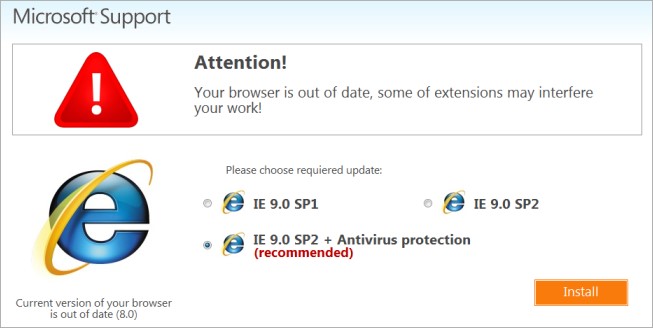
One of the most common and clever ways hackers use to get into your business systems is to masquerade and present themselves as a reliable, trusted, and often authoritative party such as a government agency or even as an anti-virus update for your system.
Please, keep in mind that NO reputable anti-virus system will ever create a pop-up prompt on your screen.
If you see this type of prompt, you should IMMEDIATELY close down your browser and power off your machine (without clicking on any links) and contact IT support.
Why so extreme? The latest Breach Investigations Report has shown that the median time it takes for an employee to open a phishing message, have it land on the company network and then compromise their business’ data is only one minute and 20 seconds. If you cannot close the browser do not click on anything, turn off your computer ASAP and contact your IT services provider.
5.) Do Not Save Passwords: Just as you wouldn’t hide a house key right under the front doormat, you shouldn’t leave your passwords saved.
When a website has a password requirement and your browser asks if you want to save your password avoid doing so, because this embeds the passwords onto your system’s hardware.

Why does it matter? When you save your passwords, if your system gets lost or stolen the thieves suddenly have access to all of your and your clients’ information.
Additionally, if you encounter any problems or have to reach out to your bay area IT services team for troubleshooting on your account, people who save their passwords usually proceed to forget those passwords. This means that whenever you request IT support, your support technicians will then have to request a new password for you.
While we are happy to help you navigate any password issues you may encounter, the reset process often leads to delays which can significantly inflate the time needed to complete your helpdesk service request and to resolve your problem.
6.) As a Rule of Thumb, NEVER, install anything yourself, EVER: One of the top ways cyberattacks succeed is through tricking employees and end users into actually installing a viruses or malicious software (malware)for the hackers; believe it or not, they get you to do their dirty work for them!

Really? But I Know Who This Is From: Even those applications that you know are from trusted sources can cause other problems further down the road if they are not installed properly. These issues pop up like weeds if there were any other kind of requirements or special configurations which may not have been installed properly or completed beforehand.
Pro-Tip: When you have the right IT support company on your side, you have the resources necessary to ensure sure your computers are configured and maintained properly. Keep things simple for yourself and use this to your advantage! (Plus, who doesn’t love coming back from lunch and finding that annoying task you were dreading fully taken care of for you?)
7.) Always Update Your Anti-Virus, and If Possible, Choose a Centrally Managed Anti-Virus: Viruses, malware and all other forms of cyberattacks are always changing, ever-evolving and improving every day.

I Already Have Anti-Virus, and Those Updates Are Annoying: Just because you have an anti-virus installed on your device does not mean that you are safe. With each new attack, both the good guys and the bad guys learn something new, and that’s exactly why it is absolutely crucial that you make sure you update your anti-virus on a regular basis.
I strongly advice that if at all possible, you work with your IT provider to find the right centrally managed anti-virus solution because this eliminates the risk of having an “oops” and “ut-oh, I forgot” moment spiral into a disaster.
With centrally managed anti-virus, your helpdesk team takes care of ensuring that updates are completed across your organization’s system on a dependable basis, and if an update fails for whatever reason, they know and can reach out to you to verify what’s going on. Without this built in-protection, it just becomes too easy to fall trap to waiting until “tomorrow.”
-
BYOD and Your Business Technology: Why BYOD Policies Are Key to Success
Bring Your Own Device: Right for Your Office IT?
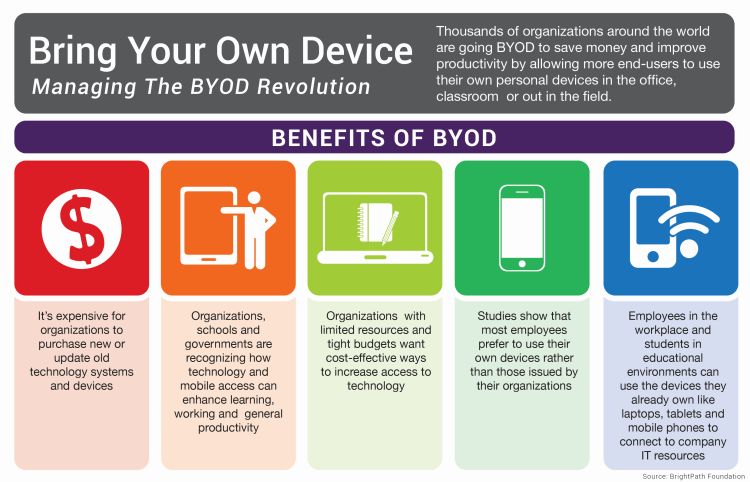
Another day, another acronym…Things have changed over the years and while BYO (Bring Your Own) may have different meanings depending where you find yourself, the popularity and importance of Bring Your Own Device (BYOD) has continued to grow rapidly over the last few years.
Why Are Businesses Choosing BYOD?
Organizations and businesses throughout the Bay Area have taken note of the:
- Cost-Savings Opportunities
- Employees’ Preferences
- Streamlining Potential
- And the Benefits of Greater Flexibility
Associated with allowing employees to bring and use their own personal laptops and mobile devices at work.
Before you introduce BYOD into your workplace, it is crucial for your organization to identify, recognize and address the potential impacts of providing full business access on employee-owned devices to your files, your data security, your business operations and even your clients.
How to get started: Proactively implement policies and procedures to govern their use from the very beginning.
Think of it this way, you want the tracks in place, headed in the right direction before you start running the train.
Why Do We Need An Official BYOD Policy?
It’s hard to remember, but those daily details such as not saving work-related login credentials may seem obvious to one user, yet could easily appear completely benign to the next.
Without the context provided by employer education or at the very minimum, a BYOD Policy (and possibly Mobile Device Management, or MDM Policy), what at first seems like a simple, seamless transition can accidentally spin out of control into a company-wide data breach or worse.

But IT Security Is Simple! It’s Common Sense, Right?
What starts out as a small concern can easily go undetected and spiral out of control when well-intentioned yet uninformed users are behind the wheel. Rh
The effects of simple “ut oh” mistakes from well-intentioned yet uninformed users are exponentially magnified as soon as devices with unstandardized configurations, a hodgepodge of unapproved softwares and unknown applications gain access to your computer network, services or advanced IT management solutions.
When your configurations and installations are completed on-the-go, whenever a user sees fit, it’s common for key security safeguards such as antivirus installations and regular updates to fall through the cracks undetected.
While this may not always present a problem on a day-to-day business, but as soon as an attack slips through, you’re suddenly finding yourself trying to put out a five-alarm fire with a garden hose…
When it comes to BYOD, your employees have the capacity to make decisions which can have far-reaching (and sometimes unintended) consequences.
For example, if one of your veteran employees just purchased a brand-new MacBook Pro…and for convenience…and because they like it more… they started bringing that laptop to work.

Now that same employee has been thoroughly enjoying having all of their work files, credentials, and possibly even sensitive client information that they need to complete their job on their go-to device…
Fast forward, and now it’s Monday morning.
- That same employee is frantically telling you about how they were tying up some loose ends over the weekend…
- They were just a few steps away from their table, ordering another coffee, when a thief ran by, scooped up their beautiful new MacBook, and ran
- They can’t believe it, happened right in the middle of working- fully logged in, device unlocked, and with a report containing secured client information open.
Soon it starts to sink in… All of the project details, sensitive client information and even the small quick-reference workbook filled with your company’s account logins have been compromised.
But My Employees Would Never Try to Harm Us!
Clearly not, you trust your team, and you’re worked hard to find the right people for your Bay Area business. When BYOD fails, it’s usually obvious there was no malicious intent, just like scenario above. (And in the rare instances where malicious intent is at hand, a conversation on “social engineering” and “insider attacks” would be necessary.)
Yet it’s simple, unplanned events such as these which can leave you fighting to protect the precious intangibles of your business such as client trust and confidence in your capabilies as well as their security.
This es exactly why BYOD Policies are crucial. When employee owned devices are not fully discussed, their access levels examined and their rights agreed upon, the “grey” area becomes a danger-zone. .
Having these rules introduced, implemented and incorporated into your business technology from the get-go is not only necessary, but also the most effective approach to help minimize the risks and maximize the benefits of BYOD.
So How Do We Structure A BYOD Policy?Throughout your years working in Bay Area businesses and organizations, you’ve seen time and again know that the success of any process, procedure or campaign boils down to buy-in.
No matter how detailed, well thought out and comprehensive a policy document is, if users don’t understand or don’t care or know it won’t be enforced, a BYOD policy becomes useless.
How Do I Set My Business Up For BYOD Success?
When you have expert resources, make sure you use them!
You know the ins and outs of your organization’s operations, but when it comes to the details of your business network and advanced technology solutions, make sure you collaborate with your IT services provider to construct practical, easy-to-understand, and simple-to-enforce policies.
By working together you can make sure that:
- Proper IT security measures are being put in place
- They are crafted to be as user-friendly as possible from an end-user’s perspective
When your Bring Your Own Device guidelines and policies are easily understood, well-explained, and consistently enforced, you can rest easier knowing that you have set your users and your business technology solutions up for success.
If you’re considering implementing BYOD in your workplace- Don’t wait, get started on building a strong foundation for your business IT today!
-
BYOD and Your Business: Why BYOD Policies Are Key to Success
Bring Your Own Device: Right for Your Office IT?
When you first hear “BYO” mentioned, office technoligies may not be the first thing that springs to mind…
Things have changed in the workplace, and BYO (Bring Your Own) has taken on a new significance as the popularity and importance of Bring Your Own Device (BYOD) has continued to grow rapidly over the last few years.
Why Are Businesses Choosing BYOD?
Organizations and businesses throughout the Bay Area have taken note of BYOD’s:
- Cost-Savings Opportunities
- Incorporation of Employees’ Preferences
- Streamlining Potential
- And the Benefits of Greater Flexibility
Before you introduce BYOD into your workplace, it is crucial for your organization to identify, recognize and address the potential impacts of providing full business access on employee-owned devices.
More specifically, this is the time to consider how providing access to your files, increasing the scope of your data security responsibilities,and how introducing unintentional side effects could affect your business, your operations and even your clients’ experiences.
How to get started: Proactively implement policies and procedures to govern their use from the very beginning.
Think of it this way, you want the tracks in place, headed in the right direction before you start running the train.
Why Do We Need An Official BYOD Policy?
It’s hard to remember, but small details such as not saving work login credentials may seem obvious to one user, yet could easily appear completely harmless to the next.
Without the context provided by employer education or at the very minimum, a BYOD Policy (and possibly Mobile Device Management, or MDM Policy), what at first seems like a simple, seamless transition can accidentally spin out of control into a company-wide data breach or worse.
But IT Security Is Simple! It’s Common Sense, Right?
What starts out as a small concern can easily go undetected and spiral out of control when well-intentioned yet uninformed users are behind the wheel.
It’s Hip to Be Square: While standard company issued laptops or PCs may scream Office IT and lack the “sexiness” of your personal top-choice device, there’s a reason corporate devices exist.
The effects of simple “ut oh” mistakes from well-intentioned yet uninformed users are exponentially magnified as soon as devices with unstandardized configurations, a hodgepodge of unapproved softwares and unknown applications gain access to your computer network, services or advanced IT management solutions.
Why Standards Matter

When your configurations and installations are completed on-the-go, whenever a user sees fit, it’s common for key security safeguards such as antivirus installations and regular updates to fall through the cracks undetected.
You may get lucky and manage to skirt problems in your day-to-day business, but as soon as an attack slips through, you’re suddenly trying to put out a five-alarm fire with a garden hose…
When it comes to BYOD, your employees have the capacity to make decisions which can have far-reaching (and sometimes unintended) consequences.
For example, if one of your veteran employees just purchased a brand-new MacBook Pro…and for convenience…and because they like it more… they started bringing that laptop to work.
That same employee has been thoroughly enjoying having all of their work files, credentials, and possibly even sensitive client information that they need to complete their job…
Fast forward, and now it’s Monday morning.
- That same employee is frantically telling you about how they were tying up some loose ends over the weekend…
- They were just a few steps away from their table, ordering another coffee, when a thief ran by, scooped up their beautiful new MacBook, and ran
- They can’t believe it, happened right in the middle of working- fully logged in, device unlocked, and with a report containing secured client information open.
Soon it starts to sink in… All of the project details, sensitive client information and even the small quick-reference workbook filled with your company’s account logins have been compromised.
But My Employees Would Never Try to Harm Us!
Clearly not, you trust your team, and you’re worked hard to find the right people for your Bay Area business.
When BYOD fails, it’s usually obvious there was no malicious intent, just like scenario above. (And in the rare instances where malicious intent is at hand, a conversation on “social engineering” and “insider attacks” would be necessary.)

Yet it’s simple, unplanned events such as these which can leave you fighting to protect the precious intangibles of your business such as client trust and confidence in your capabilies as well as their security.
This is exactly why BYOD Policies are crucial. When employee owned devices are not fully discussed, their access levels examined and their rights agreed upon, the “grey” area becomes a danger-zone. .
Having these rules introduced, implemented and incorporated into your business technology from the get-go is not only necessary, but also the most effective approach to help minimize the risks and maximize the benefits of BYOD for your Bay Area business.
So How Do We Structure A BYOD Policy?No matter how detailed, well thought out and comprehensive a policy document is, if users don’t understand or don’t care or know it won’t be enforced, a BYOD policy becomes useless.
How Do I Set My Business Up For BYOD Success?
When you have expert resources, make sure you use them!
You know the ins and outs of your organization’s operations, but when it comes to the details of your business network and advanced technology solutions, make sure you collaborate with your IT services provider to construct practical, easy-to-understand, and simple-to-enforce policies.
By working together you can make sure that:
- Proper IT security measures are being put in place
- They are crafted to be as user-friendly as possible from an end-user’s perspective
When your Bring Your Own Device guidelines and policies are easily understood, well-explained, and consistently enforced, you can rest easier knowing that you have set your users and your business technology solutions up for success.
If you’re considering implementing BYOD in your workplace- Don’t wait, get started building a strong foundation for your business IT today!
-
5 Signs You Need Professional IT Support
It can be tempting to get by with a makeshift IT system. Third-party professionals will charge you for IT services, and if you’re just backing up to a couple of hard drives, why not let the savvy computer guy handle it? Then your whole office gets hit with a virus and the computer servers crash.
IT support is a lot like health insurance. It seems like you’re paying for nothing until disaster strikes. And in the long run, you end up using it a lot more than you think. Here are 5 surefire signs you need to put aside the pride and invest in professional Bay Area IT support:
1) Your IT Support Guy Already Works In The Office
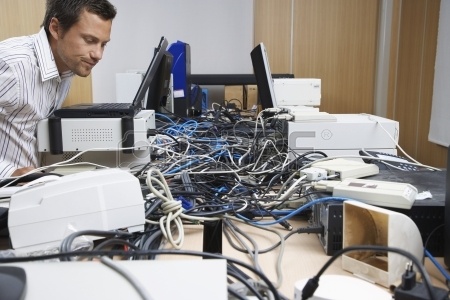
Lots of small businesses handle IT support “in-house” by having their most computer savvy employee help them with computer issues. The problem is, there’s a difference between general knowledge of computers, and the ability to handle complex IT issues that relate to data security and cloud storage. If your resident computer guy seems over his head, he probably is. Don’t make the problem worse with a trial and error approach, contact an IT services provider to see about regular IT support.
2) You’re Paying For Advice (Not Help)

Many IT consultants make good money by giving self-serving advice. They will answer the phone, listen to your problems, and give you a sage-sounding solution to “try out”. And if that fails, then you have to call them back and get some more advice. The problem with this approach is that there is no understanding of the underlying condition that is causing recurring problems. A legitimate IT services provider can help you devise a system that prevents you from having to ask for advice…or solve the problem yourself.
3) You Keep Getting Viruses

This one is pretty self-explanatory. If you keep getting computer viruses or system malfunctions, it is probably time to call for professional IT support. The money you spend on a services provider will be nothing compared to the time and lost productivity of having your computers go down. Especially if important data is being lost in the process, or confidential client information is breached (opening you up to legal liability).
4) You’ve Maxed Out Your Data Storage Capacity

If your current data storage system is about to experience a Catch 22, you should seek out a Bay Area IT services provider to guide you through this critical transition. Potentially disastrous problems could include anything from an issue with filing nomenclature (computer filing applications may not recognize Patient 10,000 as a logical extension of Patient 9999) or a lack of data capacity that requires you to juggle important files between multiple hard drives. However you choose to solve an impending data storage problem, you will be better off with an Office IT specialist there to advise you.
5) You Don’t Know What Things Are

There is now a trend for small business owners (even from older generations) to employ the most advanced technology possible. They want to have a live Skype button on their website instead of a phone number. They want to share files via DropBox instead of emailing them. They want Blu-ray enabled PowerPoint presentations. And on and on.
Whatever the trend, many business owners find themselves regularly searching for advice on how to integrate new software or technology on the fly. Who wants that hassle? Investing in professional IT support means you will never have to worry about keeping your business up to date with the latest trends. Your IT services provider will be there to handle it all for you.
If you are interested in learning more about our Bay Area IT support services, Contact Us today to schedule a free on-site assessment!



Accelerate Your Vision
Stop juggling tech headaches alone. Tell us what you need and let’s turn possibilities into actionable results.